Welcome to PHIL - The “Pharmacometrics Integrated Landscape”
The “Pharmacometrics Integrated Landscape” (PHIL) is the validated cloud-based IT landscape for our Pharmacometrics department.
PHIL consists mainly of three components (see PHIL Components Interaction):
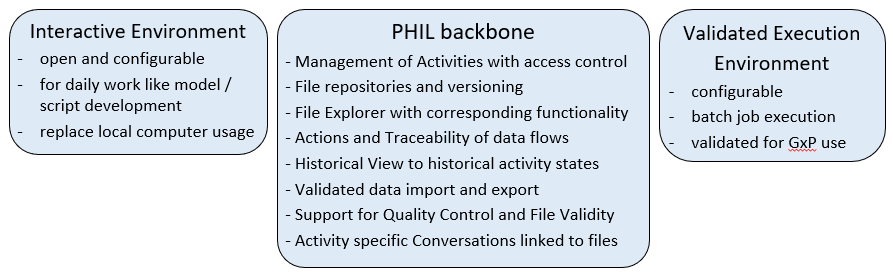
As "Internal User" you have access to all components. As "External User" your access is limited to the PHIL backbone with its functions - so you can skip the chapter "PHIL Components interaction" and the sections "Interactive Environment" and "Execution Environment" in this Manual.
Before explaining General Concepts in more detail we introduce the most basic entities of PHIL:
Activity
Activity is a special term for a project in PHIL, because the term "Project" has a special meaning in Bayer Pharma R&D, and multiple PHIL Activities can be related to one "Project".
File / File Version
A File in PHIL is identified by a path. At the same path can be stored one or subsequently more objects, the File Versions.
Each File Version is characterized by the path and the timestamp of its creation. Mostly we use the term File also to denote the most recent File Version.
Actions
Action is a generic term for everything you do to create a file in the PHIL file repository. Examples for Actions are: import or upload of files, execution of scripts or models, also moving or uncompressing files.
Conversation
A Conversation is a PHIL integrated activity specific communication consisting of multiple Comments, which can be linked to Files.
Quality Control / File Validity
File Validity means the eligibility of files for the GxP related usage, so it is a property of a File - more precise a File Version.
Validity of a File requires the successful Quality Control of all Actions in the workflow, which created that File.
Therefore in PHIL each Action has a property "Quality Control Status". (see Quality and Validity Concepts)