PHIL Components Interaction
Components Overview
PHIL backbone
Entrypoint and central component of PHIL is the PHIL backbone.
After login to the PHIL backbone and selection of an Activity you can access the versionized file repository and all functions of that component in the tabs File Explorer, History, Actions and Conversations.
It contains two more tabs for PHIL full users by which the other components can be created and used:
Interactive Environment (IE)
In the tab Interactive Env you can configure and create, manage and open Interactive Environments (IE), which roughly spoken are virtual computers in the cloud. You can even create multiple IEs, and one IE can be opened by multiple users at the same time.
The IE is connected to the internet and you can install even additional software packages there. It allows you to develop scripts and models, so you will spend much time using it. Because it is an open environment it is not suitable for validated execution.
The IE is persistent but be aware of the costs caused by each IE.
Validated Execution Environment (EE)
In the tab Execution Jobs you can define and start batch jobs, which are executed then in a temporarily created Validated Execution Environment (EE). PHIL offers also the IE-EE-bridge to combine the work in the open IE with execution in the validated EE.
File Transfer between Components
While the Activities with the versionized file repositories in the PHIL backbone (PHIL repository) are the central store for files, the files are usually created and changed by users working in the Interactive Environments (IE) or by batch job executions in the Validated Execution Environments (EE).
So it is important to understand, how the files are synchronized between these three components.
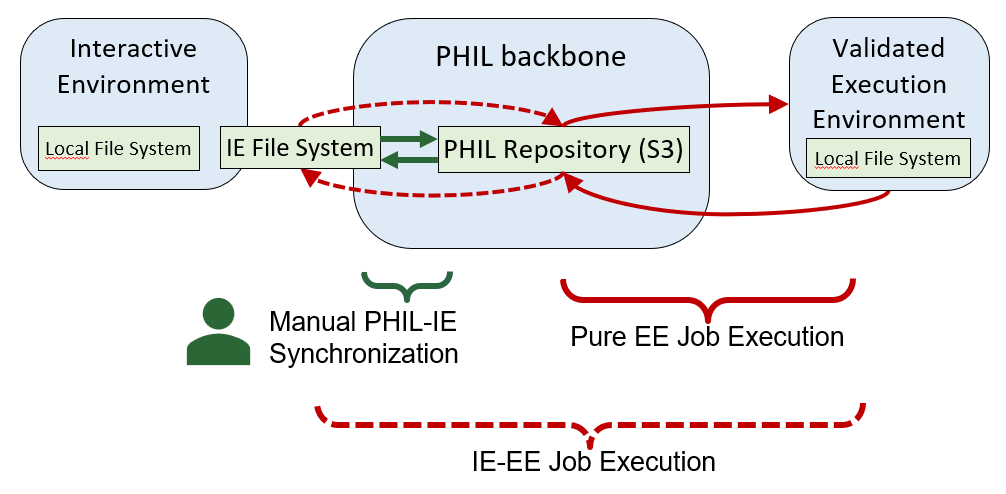
Manual PHIL IE Synchronization
The current (most recent) file versions in the PHIL repository can be transferred to a File System, which can be accessed as a file share from the Interactive Environment. For simplicity we call this file system in the following IE File System, although it is not the local but a remote access file system from IE perspective (See Interactive Environment)
The content of the PHIL repository and of the IE File System can be compared at any point of time to identify differences: Files added, modified or deleted on the one or the other side. Based on this comparison files can be selected and synchronized in both directions. (See File Comparison)
You should synchronize IE File System and PHIL repository periodically, ideally on a daily or at least on a weekly basis.
This help you to keep track with the changes, to decide about the validity of files uploaded from IE to PHIL and avoids large number of different files which hinders overview and performance in comparison.
Pure EE Job Execution
Transfer of files between PHIL repository and Validated Execution Environment (EE) is much simpler.
During the definition of a job you specify script and other input files, which during job execution are automatically transferred to the EE; after job execution on EE the result files are automatically transferred back to PHIL repository and stored there as new file versions. Note, that the EE only exists during job execution and is removed afterwards. (See Execution Environment)
IE-EE Job Execution
You also can combine the simple creation and editing of files in the IE with using these files for job execution in the validated EE.
For this PHIL provides the IE-EE-bridge: In the definition of a job you can select an IE and then select the script and other input files from its IE File system.
Before the pure EE job execution these input files are uploaded automatically from IE to the PHIL repository when they are new or modified. After the pure EE job execution the result files are transferred back from PHIL repository to the IE File System, so that you can inspect and use the results for your subsequent work in IE. (See Execution Environment)